The Radial Dimension tool measures and marks either radius or diameter dimensions for arcs and circles. This tool does not work on ovals, or objects with rounded corners.
The Radial Dimension tool can place the dimension lines and measurements either inside or outside of the circle/arc.

The Internal Diametrical Dimension mode measures and dimensions the diameter of a circle or arc, and places the dimension inside the object.
 |
|
1.
|
Click the Radial Dimension tool from the Dims/Notes tool set, and select Internal Diametrical Dimension mode.
|

The External Diametrical Dimension mode measures and dimensions the diameter of a circle or arc, and places the dimension outside the object.
 |
|
1.
|
Click the Radial Dimension tool from the Dims/Notes tool set, and select External Diametrical Dimension mode.
|
To place them to the right of the line, click Right-Hand Shoulder mode button.
To place them to the left of the line, click the Left-Hand Shoulder mode button.

The Interior Radial Dimension mode measures and dimensions the radius of a circle or arc, and places the dimension inside the object.
 |
|
1.
|
Click the Radial Dimension tool from the Dims/Notes tool set, and select Interior Radial Dimension mode.
|
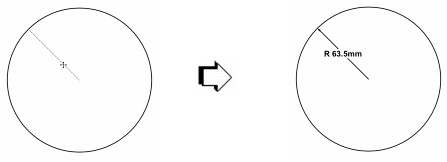
The Exterior Radial Dimension mode measures and dimensions the radius of a circle or arc, and places the dimension outside the object.
 |
|
1.
|
Click the Radial Dimension tool from the Dims/Notes tool set, and select Exterior Radial Dimension mode.
|
To place them to the right of the line, click the Right-Hand Shoulder mode button. To place them to the left of the line, click the Left-Hand Shoulder mode button.
